Features
Structured per-session facts distilled from the metrics and written to SQL, enabling cross-session analysis.
Last updated Applies tortcstats-serverrtcstats.com
Data Structure & Analysis7 articles
On this page2 sections
Features are structured per-session facts distilled from the metrics and written to SQL, enabling cross-session analysis. Where Foundations and Calculations describe a single session's metrics over time, Features compress each session into roughly 100 typed values you can query across every call.
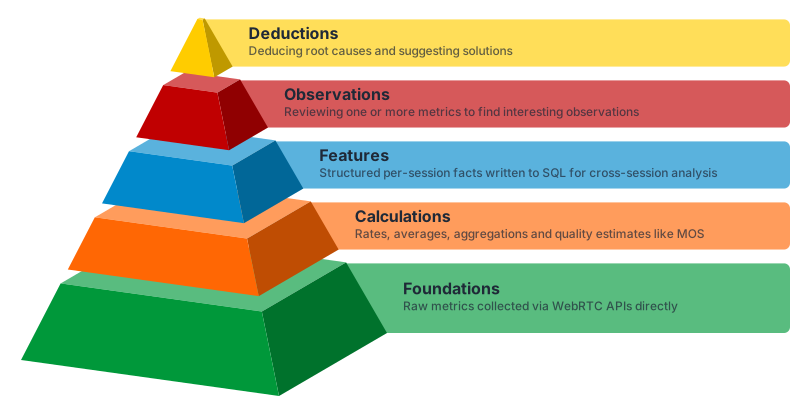
This is the layer that turns "upload a dump, see what happened" into "run the server, get cross-session intelligence." Once the facts are in SQL you can ask questions across all of your sessions: how call setup time changed after a deployment, what share of calls relayed through TURN last week, which browser version regressed on video freezes.
The three levels
Features are extracted at three levels, mirroring how a WebRTC session is structured. A session has one client, one or more connections, and zero or more tracks per connection:
- Client (one per session): the browser and device, getUserMedia and getDisplayMedia usage, device enumeration, the upload WebSocket.
- Connection (one or more per session): each RTCPeerConnection, its DTLS and ICE setup, configured ICE servers, the selected candidate pair, lifetime averages, geolocation.
- Track (zero or more per connection): each media track, its codec, resolution, quality limitation, freezes, jitter buffer, encoder and decoder.
Each level maps to its own database table, so you can join them back into a whole session.
Open source and local
Feature extraction is the local layer. It runs inside your own rtcstats-server, on the infrastructure you already run, and it is open source and free. The layers above it, Observations and Deductions, are produced by the rtcStats enrichment engine, available both on rtcstats.com and as an on-premise enterprise package.
For the authoritative list of every extracted feature, its database column, and how it is derived, see the rtcstats-server feature extraction hub and the SQL cookbook.
To browse the per-feature articles here in the knowledge base, check out our WebRTC Metrics section and filter for Features in the left-hand sidebar.
Was this page helpful?